Thursday, February 20, 2025

Insert Here Joke About The 'S' In IoT: ___________

                    ─ Anne Rice

            "One moment the world is as it is. The next, it is something entirely different. Something it has never been before."


忍耐 (Nintai) – Endurance & Patience

Life has its twists, turns, tugs, and takes, right?

Lately, I’ve been (kind of) ‘forced’ to plunge into radio waves—5GHz, 2.4GHz, channel allocations, and even how certain countries restrict radio some frequencies.

"Woah, so new job and you got more free time to explore stuff?"

No. Not really.

If anything, I have less free time than ever. Firewalls, network congestion, MAC virtualization, plus remembering things I learned over a year ago, while picking up new tricks along the way. But here’s the thing—I get to manage my time better (to a point). 

Not because the workload is lighter, far from it.

The difference? I’m not buried neck-deep under tickets every minute of my working day. Instead of having problems chase me around nonstop, I carve out specific windows to troubleshoot, test, and develop strategies─tackling issues before they spiral out of control. And when the odd danger moment does come up, I can devote my time and energy to it.

A three-hour troubleshoot session? No problem. An endless stream of tickets for three hours? That drains the life out of you.

Drop by drop.


So, I decided to get my hands dirty and learn a bit about IoT hacking. Why the hell not?

I didn't get the luxury of studying computer science or electrical (or-anything-very-technical-really) engineering for 3 years in college─on the other hand, that gave me the privilege of carving out my own study program, and avoiding dumb, mandatory courses.

I started with this Defcon32 talk, which was surprisingly accessible, straight to the point, and fun. After that, I picked a target, got some basic tools, and started tinkering.

                "Nice IoT you got there, friend. T'would be a shame if something happened to it..."

It's not about going uber deep on this, it's about understanding a bit more about the field, getting our hands dirty and seeing if anything clicks. Also, you never know when any of this might come in useful.

Never in my life have I ever wanted to become a DB engineer, or backend mantainer, but I don't know how many times it has been extremely useful to know how to query a DB or create a View.

And always: The journey is the fun part.

Meanwhile, I've been chipping away at Practical Malware Analysis (yikes, he likes books!) but I'm saving that for later. I'll need some time to organize my notes and scribblings into something half-decent, before that becomes a blog post.


Honestly, I kind of envy the people who seem to have all the time in the world to write massive, in-depth blog posts. How do they do it? I guess, like anything else, it comes down to practice—it gets easier the more you do it.

I'm lucky if I manage to put out one of these out every so often.

But hey─if you're deep into your own projects, I hope you're having fun.


Thursday, February 6, 2025

Wherein We Forsake: Farewell and Godspeed


棄 - 'to forsake', 'to discard', 'to renounce'

My friends are leaving.

Some were close friends; others were simply colleagues. But if you think about it, we spend so much time with our workmates that they become more than just faces we see at work—they’re part of our daily lives. For many of us, we see our colleagues more often than our families.

I sleep very little, which gives me some extra home time, but still, the reality is that I spend most of my waking hours surrounded by these people. And now, a significant number of them are gone.

I feel sorry for them and for us. I liked many of them, and from what I saw and heard, most were incredibly skilled at what they did. Their departure wasn’t their fault.

So today’s post is a tribute to them.


It’s been a month since I’ve written here. In that time, I’ve made a diagonal move in my career (up and to the side) into the role of network specialist. With this role comes a fair amount of autonomy to decide how to implement and secure systems. My onboarding is still ongoing, but I feel the itch to write and return to one of my passions: reverse engineering (RE).

Not today, though. My focus lately has been squarely on network security, and I’ve been wrestling with a thought that might resonate with some of you network addicts:


Network Protection vs. User Accessibility

How do you strike the right balance between keeping a network secure and ensuring it’s user-friendly?


The Freeloader Debate

When managing a network—especially one shared by multiple teams or even public users—you’re forced to ask yourself a tough question:

Do you lock it down, leave it open, or what?


Option 1: Lock It Down?

You could go full-on security mode and control every possible access point. Some options include:

  • Blocking unapproved MAC addresses.
  • Whitelisting only specific devices.
  • Creating VLANs to isolate users and devices.

This approach keeps freeloaders and unauthorized devices off your network. But at what cost?

  • Your IT team faces a constant workload managing requests and ensuring critical devices aren’t accidentally blocked.
  • Field teams and guests are often frustrated when they can’t connect because their devices are blocked by default, leading to complaints and delays.


Option 2: Leave It Open?

You could take the laissez-faire approach. Just let everyone connect. No restrictions. No extra work.

But this comes with its own set of risks:

  • An overloaded network, with too many devices competing for bandwidth and impacting performance for critical systems.
  • A wider attack surface, as bad actors could exploit this openness to gain unauthorized access.
  • Difficulty in tracing network activity, making it harder to identify devices or users when issues arise.

As a wise Jedi once said, “Only Sith deal in absolutes.” Neither extreme is sustainable. A locked-down network might keep freeloaders out, but it also hampers legitimate users from getting their work done. On the flip side, an open network exposes you to security risks and performance issues.

Without going into the nitty-gritty of it all, here are some alternative strategies:

  1. Set Up a Guest Network
    A dedicated guest network with bandwidth throttling and basic isolation ensures that guests can connect without overwhelming critical systems.

  2. Implement Role-Based Access
    Integrate with RADIUS or Active Directory to dynamically assign permissions based on roles.

  3. Use Time-Based Access Policies
    Temporary users (e.g., guests or contractors) can be assigned access that automatically expires after a set period, preventing long-term freeloaders.

  4. Monitor and Audit Regularly
    NetFlow or your router’s built-in logging can track activity. This helps detect anomalies before they become bigger issues.


This isn’t just about blocking bad actors—it’s about enabling legitimate users while minimizing risk. It’s a game of checks and balances, not unlike managing resources in an economy or a strategy game.

I can’t go into much detail for obvious reasons, but I wanted to share this small glimpse into a different side of cybersecurity—one that’s as much about people as it is about technology.
I know, I know, too basic: and you're right. Besides, the fun is in the little details, and the clever choices you make. Right? But today is not the day for that.


To My Friends

So, to my friends who weren’t freeloaders, who worked hard, and who I’ll miss:

Stay strong in the trenches, stay inspired, stay healthy, and remember—every system, like every farewell, brings its own challenges and opportunities.

Roger and out.


Tuesday, December 31, 2024

Wherein We Face A Lindwyrm: don't do LeetCode


                    The Lyndwurm. Let's face it sooner. Not later.


Before diving into LeetCode, let me tell you this post was initially going to be about my journey completing a series of 30 Assembly CTFs on pwn.college. It still is, in a way, and I highly recommend that site to anyone interested in hacking and low-level programming (check that site─totally worth it). 

But somewhere along the way, I decided to shift the focus. So, bear with me while we explore LeetCode.

Let’s start with the disclaimers:

  • I’m happily employed.
  • My knowledge of the hiring process is limited to my own experiences and what I’ve observed.
  • Take everything I say here with a grain of salt.

What Are LeetCode Problems?

LeetCode-style problems are algorithmic and data structure challenges, often used in technical interviews to (supposedly) assess problem-solving skills, logic, and coding efficiency.

I’ve tried LeetCode. I even did a fair bit of it back in university while studying Python. And I’m here to tell you: it’s not for me. It's probably not for you, either.


Here are 10 reasons why I’ve left LeetCode by the wayside:


1. I’m not a programmer, nor do I want to be one.

I work in IT and am aiming to become a Cybersecurity professional, specifically a Reverse Engineer/Malware Analyst. In this realm, LeetCode is of very limited relevance, if any. My focus is on low-level code, systems, and security—not cranking out optimal algorithms for abstract, byte-sized, problems.


2. Time is sacred, and LeetCode doesn’t fit my priorities.

Mastering LeetCode takes time—lots of it. As someone who obsesses over how I spend my time, I refuse to pour hours into a skill I find doubtful in utility for my goals. Instead, I could be:

  • Diving deeper into malware analysis.
  • Learning more about CPU internals.
  • Experimenting with Reverse Engineering tools.
  • Or even doing other wholesome hobbies like: fishing, watching paint dry, or fine-tuning push-ups.

3. It consumes mental bandwidth I’d rather use elsewhere.

Focusing on LeetCode takes up space in my brain that I could dedicate to something more relevant or enjoyable. Cybersecurity is vast, and every moment I spend on coding puzzles is a moment I’m not spending on fun puzzles.


4. There are other ways to demonstrate my skills.

I maintain a public GitHub with projects I’ve built. If someone needs proof of my abilities, I can show my work or create something on demand. Writing scripts or automation tools in a real-world context is more relevant to my career than solving arbitrary LeetCode.


5. Secure, readable code > Clever one-liners.

LeetCode often rewards speed and brevity, which can lead to unreadable, messy solutions. Writing secure, stable, maintainable code that other humans can understand is far more valuable in real-world applications.


6. In cybersecurity, CTFs are the way to go.

Capture The Flag challenges (CTFs) are like games. They’re fun, align with the hacker spirit, and teach you practical skills. I’d rather do CTFs all day than grind through LeetCode puzzles.


7. Better ways to assess pressure and skills exist.

In addition to several other assessments, my current company included a 1.5-hour test during the hiring process that challenged me to work under pressure, adapt to new situations, conduct research, and document my process. It was hard, fun, and incredibly insightful. If they had instead asked me to solve 10 LeetCode problems, they wouldn’t have learned anything about my actual skills. No joke—this test was fantastic.


8. I’m not here to compete with kids who have all the time in the world.

If I have two free hours, I’ll use them to play in my malware lab—not grind Python or C snippets on Codewars. I have nothing to prove to anyone, and I’m not interested in chasing someone else’s benchmarks.

Years ago, I participated in a BJJ tournament and won (blue belt +40 years category). At the end of the tournament, all the blue belt winners were allowed to face each other in a 'free-for-all styled' match. I said no. I had nothing to prove. I knew the outcome, too─there was no point in fighting guys who had trained as long as I had but were 20 years younger and weighed 20 kilos more. 

Here's what I looked like after winning in my category:

                                                        Cute, huh? Third place didn't even get a medal. He got a broken rib and a trip to the hospital.


9. I’m not missing meaningful opportunities.

Sure, some companies prioritize LeetCode skills, but those are likely not the places I want to work at. I’d rather focus on preparing for roles that value my expertise in cybersecurity and low-level systems.

On the flip side, if I do receive a job offer from a company looking to assess my "cyber skills," I’ll be in a much stronger position if I’ve invested my time in honing those skills, rather than spending it on LeetCode.


10. Burnout is real.

Burnout is pervasive in IT. I’ve seen people so drained by their work that all they want is to clock out and forget anything technical. They crave time for hobbies, family, and friends, leaving the techie stuff for when it’s absolutely necessary. Not me. I dive into reverse engineering because I genuinely enjoy it, but I make sure to balance it with other hobbies, family time, and necessary downtime. Chasing someone else’s dream isn’t worth sacrificing my mental health.


Final Thoughts

For those who insist we must suffer through things we hate to secure a “dream job,” I leave you with this quote from Game of Thrones:


Sunday, December 22, 2024

Wherein We Look At An ELF: Executable and Linkable Format


                So, this is an ELF file, huh?


Elves

For the past few days, I've been delving into ELF (Executable and Linkable Format) binaries—specifically focusing on their structure, behavior, and ways to manipulate them. If the subject matter is of any interest to you, then check this out.

What are ELF files?

They are a "common standard file format for executable files, object code, shared libraries, and core dumps, at least according to Wikipedia.
The magic number for ELF files is 0x7f 45 4C 46. Care to guess what's 45 4C and 46 in ASCII?

Let's look at (yet another) terribly simple C script and then look under the covers:


Not terribly impressive, but we're not trying to be terrible or to impress anyone.

Remember when we talked a bit about the 4-step compilation process here? Instead of directly compiling this program, let's jump to the Assembly phase and look at the object file:


So, as we can see, we have a 64-bit ELF object file... relocatable. What does it mean for this to be relocatable?
It means that it's not dependent on specific memory addresses. So this file can be moved around without breaking its code. Our code isn't yet an executable. We're still short of that objective since we've not yet passed through the linking phase, which will or might add to it other object files or libraries, and then yes, produce our executable.

Remember that, for the most part, programmers skip and don't even think about these steps. The compilation process takes care of all of this in the background, and only if something is untoward will the programmer be warned that one of these 4 steps went awry.
And notice as well that this file is 'not stripped'. What's this, you ask? It's informing us that the the file contains the symbol table and debugging information within it. This keeps information that is useful for debugging purposes, making it easier to analyze and understand what's happening, with tools like gdb or objdump. On the other hand, stripping our binary means that both symbol table and debugging info will be removed. The symbol table contains the names of functions, files, variables and other metadata useful for debugging or reverse engineering. And that extra debugging info shows the variable types and line numbers, for example.
So, stripping will reduce the file size, hide implementation details but also make debugging a bit harder.

Under the hood

Let's do it. It's pretty simple, actually. After finally creating our binary, we can strip it with:
strip --strip-all simple_adder

Here we can see the difference between the two files, through the use of the command readelf:


It's a bit rough around the edges, but if you look carefully, you can see two files, one stripped and one not stripped, and the difference is telling, even for such a small binary.
Obviously, stripping is also used as a countermeasure and obfuscation technique.

The readelf command that you see up there is a tool for analyzing and displaying information about ELF files. With it, we can inspect the internal structure of ELF files, such as executables, shared libraries, or object files. Yes, it's what that ELF lady is doing at the beginning of this blog post. I know. Genius.

Readelf comes in handy to debug linking issues or to understand how an executable or a library is laid out.
As per usual, man files are your friend here.


.text, .data, .bss and .rodata

Elf files have critical areas, like .text which contains executable instructions, .data which stores initialized global variables, .bss which holds uninitialized global variables and .rodata, which holds read-only data, such as constant strings.

We can inspect the .text section, which could be considered as the heart of the program (holding the executable code, really), with a tool like radare2 or objdump, for example:


As you can see, this is giving us Assembly code (in AT&T, no less... yuck) revealing function prologues, loops, and system calls.
Of course, recognizing these patterns is a vital skill for the Reverse Engineer.

Try this for yourself. Also remember to check .data and .bss with:
readelf -x .data your_file
readelf -x .bss your_file

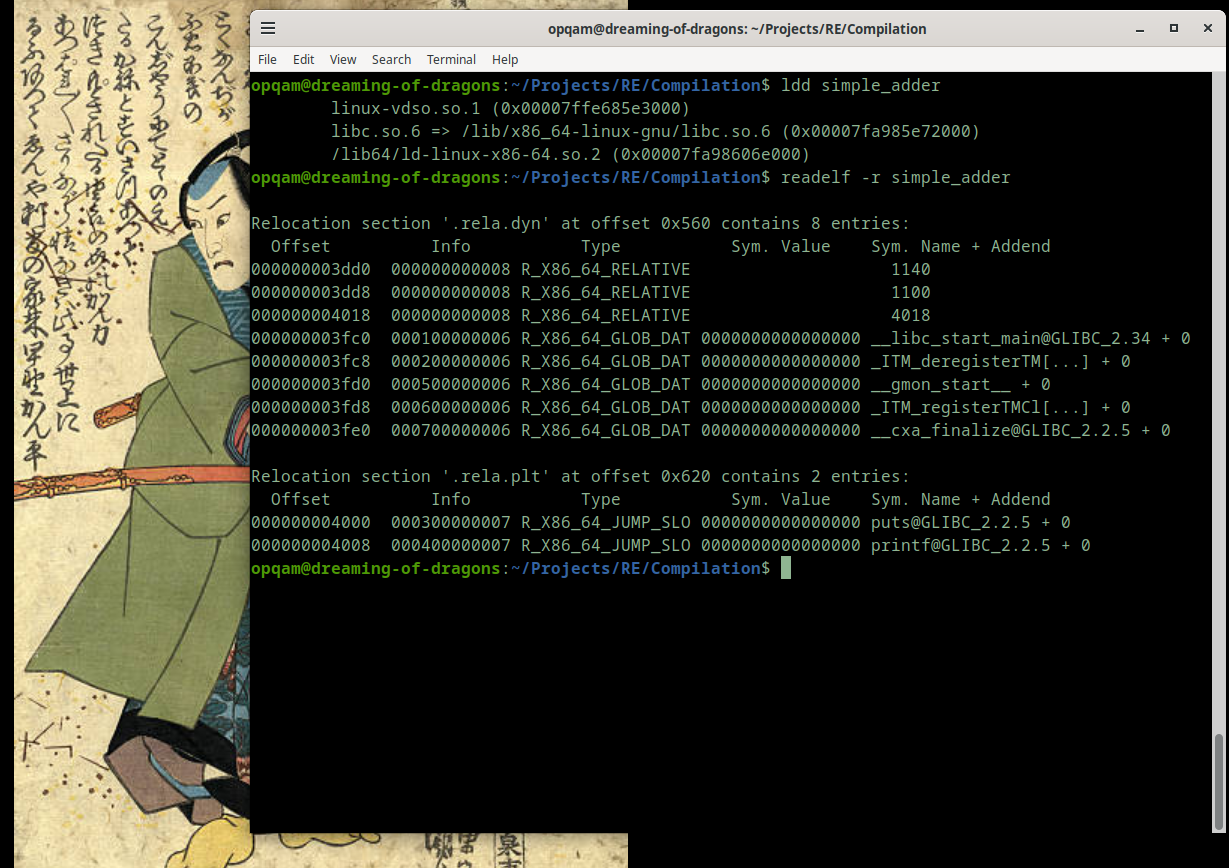
But there's more ways to inspect your ELF files. Let's look at ldd which prints shared object dependencies and use readelf with '-r' to check relocation tables:


What's all of this, you say?
With ldd we can check the shared libraries within our binary. Each listed library representing a dependency. And relocation tables are essential for adjusting addresses in a dynamically loaded binary. Entries like R_X86_64_JUMP_SLOT or R_X86_64_GLOB_DAT help resolve function calls or global variables at runtime.

There's more, of course. But this stuff is much more fun to experiment with than just to talk or write about.

Go at it. Experiment with creating your own binary files and examine them with any or all of these tools (or others). Change things, check again.


No elves were harmed in the making of this blogpost. Nor any DWARF, of course.


Sunday, December 1, 2024

Wherein We Pause to Reflect: Simple ASM Review and OS Security Mechanisms


Hey! Corny matrix-styled dojo. Why not?


Let’s kick off today’s blog post by writing a very, very simple ASM program. Since I’m reviewing ASM stuff through pwn.college’s course, why not showcase how simple ASM can be? (In a way... math is simple too, but many would argue otherwise).

Our script will be called one-oh-one.s, and our program will be called pausing—since that’s what we’ll want at the end.

Let's start with a program that starts and ends. Simple enough, right? But for that, we need to pass execution to the OS via a syscall (remember those?). To do this, we can move the value 60 into the rax register. Here's how:


Simple enough! But if we try to assemble and link this, we’ll hit an issue:


Ah, much better. Now, our previously failing program is a success... of sorts. We made sure to run with Intel syntax, which is much cleaner (at least to my eyes). We also made the _start label globally visible so that we can indicate where our program begins.

Now no more errors, and we’re ready to tackle the rest of the program. Easy peasy.

Right! While I was trying to set up a pause in my program, I ran into an issue. The syscall I thought was the right one for pausing was actually wrong. So, since I’m working on Linux with x86_64 architecture, I checked /usr/include/asm/unistd_64.h to see which syscalls I should use.

There, I found the exit syscall (60), which needs to be loaded into rax (which we’re already doing). If we want to set an exit code, we need to load it into the rdi register. Fair enough, we can do that. As for the pause syscall, we need syscall 34. I also discovered the alarm syscall (37), which sends a SIGALRM, ending the pause syscall. Without this, we'd have to ctrl+c our way out of the program. We also learned that we need to pass a parameter through rdi. Easy peasy.

Now that we have the tools, let’s create our pausing program, assemble it, link it, and run it while checking for our exit code:


Don't know about you, but I love this!

Now, let's review other concepts. For instance, in pwn.college, you can learn how to point to a specific memory value or the contents at that memory location.

Let's say there’s a memory position 12345 holding the value 42.

If we do:


mov rdi, 12345

We're making it so that rdi will hold that number 12345.

But if we do:

mov rdi, [12345]

Now rdi will hold the value at memory position 12345, which is 42, just like the value stored at that location.

I won’t dive too much into these basics because I’m sure you either already know them or want to experiment with them yourself. Just remember that the OS will have some defenses in place that may make it difficult, if not impossible, to access specific memory locations in your binary.

You can check which defenses have been enabled with a tool called checksec:


Please take your time and check what each of these items does. Here's a quick rundown:

  • RELRO: A security feature that makes it harder to modify certain parts of a program, like its GOT (Global Offset Table), preventing attacks on function pointers.
  • STACK CANARY: A protective value placed on the stack to detect buffer overflow attacks before they overwrite important data.
  • NX: No-Execute; prevents code from running in certain areas of memory, like the stack, to stop exploits that execute malicious code.
  • PIE: Position Independent Executable; allows a program to run at random memory addresses, making it harder for attackers to predict the location of code.
  • RPATH: A runtime setting in executables that specifies directories to search for dynamic libraries before default system paths.
  • RUNPATH: Similar to RPATH, but it is used after LD_LIBRARY_PATH to specify directories for locating shared libraries at runtime.
  • Symbols: These represent function names, variable names, and other references in the program’s code, helpful for debugging or exploitation.
  • FORTIFY: A set of compiler protections that enhance the safety of certain library functions, like checking buffer sizes to prevent overflows.
  • Fortified: Refers to functions that have been modified with additional checks (from FORTIFY_SOURCE) to improve security against buffer overflows.
  • Fortifiable: Functions that can potentially be fortified using additional checks to prevent common vulnerabilities like buffer overflows.
  • FILE: Refers to the executable or object file format, containing the machine code, symbols, and metadata that the operating system uses to load and run the program.


Like I said, a quick rundown, but it’s worth spending time learning about these defenses—what they do and how to set them up to adequately inspect a binary. Also, note that this applies to ELF files.

Alrighty, another short one! Hope you had fun.


Monday, November 18, 2024

Wherein We Do Some Magic!: File Headers


All the world's a stage, and all the men and women merely players


Today, we'll be talking about File Headers, also known as Magic Numbers.


These are specific sequences of bytes at the beginning of files that identify the type and format (e.g., PNG: 89 50 4E 47). They facilitate programming by allowing quick identification of the type of file being used, precluding the need to search within the file for specific functions or structures.


GZIP: 1F 88 08


As you can see here, the GZIP signature is right at the beginning of the file. Throughout this blog post, I'll be using tools like xxd (which we've seen before) to actually check these headers.


In Reverse Engineering, these file signatures allow for quick identification of files, detect tampering with said files and determine the appropriate tools or parsers to use.

Remember that file signatures can be modified to disguise file types or to bypass detection. Malware often uses such tactics, obfuscating payloads to evade analysis.

It's a good idea to practice in identifying these numbers. If, for some reason expected signatures aren't detected, it might  be a good idea to whip out a hex editor like xxd or use tools like file or binwalk to analyze headers.  These commands and tools rely on databases of known file signatures to identify file types and structures quickly.

- The file command, in particular relies on a magic database (commonly /usr/share/misc/magic), which contains predefined patterns for file headers.

- binwalk goes beyond headers to scan the entire binary for embedded file types or compressed data. It also uses signature databases but is more specialized for firmware analysis, detecting compressed archives, or images embedded in binaries.


JPEG: FF D8 FF E0


Speaking of JPEG files, I found an interesting challengee on a CTF: I was presented with a data file which was hard to interpret. This was its header:


If we know nothing about headers, then this is meaningless. 

But if we recognize the JPEG signature, then we can see that the header is there, but reversed in 4-byte chunks (due to endianess). So I wrote a python script to process the whole file, reversing the byte order, 4 bytes at a time.


When that was done, the weird file was shown to be a well-behaved JPEG file (containing a flag). CTFs are fun!

ELF: 7F 45 46


But there's more to headers than just the initial signature. For instance, in this ELF file, if we look beyond the initial bytes, we can see:
  • 02 -> 64-bit (0x01 for 32-bit)
  • 01 -> Little-endian (0x02 for big-endian)
  • 01 -> Current version

You can extract this information with tools like readelf (as shown above). For images, tools like exiftool are handy for extracting metadata embedded in files.

There are tables and references available for identifying these headers. Take some time and explore this stuff.
Whether you're debugging a binary, hunting for a flag, or analyzing malware, knowing these magic numbers can make all the difference.

Lift the curtain and have some fun!

PS: do tarballs work as expected? 

Saturday, November 16, 2024

Wherein We Crack Yet Another Program And Learn Something In the Process: part three (or something)


So, let's fast-forward through this first part. While it was revealing, it wasn’t all that great. Informative? Sure. Exciting? Nah.

So we can skip the fluff.


There I was, creating yet another C program to crack—asking an LLM (Large Language Model) to be rough with me. I told it to place whatever protections it found amusing, especially ones that might put a damper on my usual GDB shenanigans.

I whipped up a simple C program with some XOR gimmicks and handed it over to the LLM, telling it, “Go nuts. Protect this binary as if your life depends on it.”(I might be paraphrasing here).

The LLM's Attempt at a Challenge

Well, the LLM tried, but it failed pretty hard. Not because I’m some kind of binary-reversing wizard (I’m not), but because its defenses mostly relied on surface-level userspace tricks. These are the kinds of protections that look flashy but crumble under the weight of a determined debugger wielding carefully placed breakpoints.

Let’s cut to the chase: here’s a snippet of the original code it generated:


Breaking the "Protections"

Most of these defenses—fake functions, misleading execution flows, or basic obfuscation (not all seen here)—can be easily defeated with a debugger. When you examine the binary at runtime, these kinds of tricks are more like a speed bump than a roadblock.

GDB was enough by itself to detect the two main weaknesses—key+encrypted password:


And voilà, a quick peek into those memory locations reveals the key and the encrypted password. Nothing we haven’t seen before:


The logic here is straightforward. By reading the ASM, we can tell there’s a xor operation happening, and the key is being repeated (via a modulo 4 operation) to match the encrypted password’s length (10 characters).

Great! From here, undoing the operation is trivial. A simple Python script does the trick:


And that’s it. We have the password, the binary is cracked, and we move on.

Lessons Learned

What’s the moral of this part? Don’t store your bloody password and key inside your binary. Ever. Seriously, it’s like leaving your house key under the mat and hoping no one checks.


This reminds me of that guy who stored his password inside his binary while working on a GitHub project with full version control. He was surprised to find others knew the pass, regardless. 


What's Next?

I could create more complex C programs where the password lives elsewhere (maybe a server, maybe environment variables), but honestly, that defeats the purpose of this kind of exercise. Plus, it opens up a whole other can of worms I don’t feel like opening just yet.

Instead, we’ll dive into Binary Security: NX, ASLR, RELRO, Stack Canaries, and how these mitigations shape the reverse-engineering landscape.

It’ll be fun (or your money back—promise).


SUDO INIT 6: Rebooting Your C Journey

                                                                  Yeah, let's do just that. So grab some popcorn and lean back.   I'...