Showing posts with label Memory. Show all posts

Sunday, September 6, 2026

SUDO INIT 6: Rebooting Your C Journey


                                                    Yeah, let's do just that. So grab some popcorn and lean back.


I've said it again and again: To teach is to lie.


I'll simplify things. A lot.

Not that the details aren't interesting, but if I start throwing around PTEs, PFNs, page faults, kernel internals and CPU privileges from the beginning, nobody is going to read this.

Worry slightly, though. I'll throw some stuff your way. End of warning.


I Wanted a C project


I've been learning C for a while and I genuinely like it. I like it a lot. But I don't like the "just build a project!" approach to learning.

Build an app.

A website.

A to-do list.

A game or something that simplifies your life.


Just do a project = me dead inside


Yeah, that's not me. I'm not a programmer. I don't want to build an app and spend months adding features, fixing bugs and maintaining it. That's not me. To me, these kinds of projects are mood-killers.
 

What I do enjoy is understanding what the machine is actually doing. I want to use C to ask questions about the stuff I really want to understand.

And I've been having some success learning C and Assembly while also playing around with microcontrollers and lower-level concepts: memory, pointers, addresses, system calls, how OSes work, and so on. 


A Memorable Idea?


 I knew that a process doesn't deal directly with physical RAM addresses. It works with virtual addresses.


The CPU and OS cooperate to translate those virtual addresses into physical addresses. The OS sets up the mappings; the CPU's memory-management hardware uses them.

The details are considerably more interesting, but let's keep this mental picture for now:

Process --> Virtual Address --> Translation --> Physical Address 


I also knew that, under certain conditions, the relationship between virtual and physical addresses could change.

The same virtual address could end up referring to a different physical page.

So, could I force those conditions? Can I make one of those addresses change?

Hey, isn't this a project of sorts?


I was hyped. And that's a good sign. If you are ecstatic about doing something that is useful for what you're studying, something you actually want to become good at, that's a good sign. 


The Plan


 I started by asking myself some questions and starting small:

- Can I get the PID of a process? Of course, easy.

- Can I allocate a page? Probably.

- Can I print the virtual address? Sure. 

- Can I figure out which page that address belongs to?

- Can I find the corresponding physical page?

- Do I have enough privileges for anything related to the physical address?


And finally, when I know I can access all of this and print it to stdout:

- Can I make the relationship change while the process is still alive? 


Oh, but for context mmap() in ASM was the touchstone that made me trip into this rabbit hole. I even considered building my whole project in ASM, but then briefly considered how much pain I was willing to accept. So C it was!

mmap()


If you haven't used it before, mmap() is a Linux/POSIX interface that lets a program create mappings in its virtual address space.


For my first experiment, I used it to create a mapping for a single 4096-byte page of memory. Remember that 4096 bytes in decimal is 0x1000 in hexadecimal. 


This was important because 4096 bytes is also the page size I'm working with here.

A 4096-byte page needs 12 bits to identify any byte within it, because:

4096 = 2¹²

So, the lowest 12 bits of a virtual address tell us the offset within the page. 

Everything above those 12 bits gives us the virtual page number.


Once we have the virtual page number, we can find the corresponding entry in pagemap. 

There is one 64-bit entry in pagemap for each virtual page. So, to find the entry for our virtual page, we multiply the virtual page number by 8. 


A pagemap entry consists of several pieces of information. I care here about the Page Frame Number (PFN), which tells me which physical page is backing the virtual page. 

Then I wrote a value into that memory:

42 


So far, nothing particularly exciting. Just moving along and gathering our LEGO bricks.


But now we had our program, a process, a virtual address, a page, and a value stored at that address.

I made the program request the user to press the Enter key. This way, it was kept alive.


But where is that page actually sitting in physical memory? 

Linux provides an interesting interface for this:

/proc/<PID>/pagemap


This is a kernel-provided interface that lets a userspace program inspect information about a process's page mappings.

In particular, a pagemap entry can contain the PFN, corresponding to a virtual page.

And, from here, the physical address is fairly straightforward:

Physical Address = PFN x page size + page offset


So, now I had all the bricks that I needed.

I also learned that you needed the appropriate privileges to actually access the pagemap. 

Root isn't necessarily equivalent to having every Linux capability. On my system, I needed the privileges associated with CAP_SYS_ADMIN to obtain the PFN information from pagemap.

And that gave me another little rabbit hole: being root and having a particular Linux capability aren't quite the same thing.


Experiment A (first steps) or, as  Ilike to call it: To Sudo or Not to Sudo 


The Experiments


I called these the experiments. Gathering all the tools I needed was Experiment A. I now wanted to jump into Experiment B, where I'd try to change the physical address.

I knew one cheaty way to do it.

I knew about Copy-On-Write (COW). I'd recently been reading about COW in another context, including some security research involving COW-related behaviour.

So this seemed like a natural place to start.


The basic idea behind COW is pretty simple to understand:

Suppose a process has a page containing some data. Now we create a child process with fork() - see here.
The child gets its own process and its own virtual address space. 

But, for the moment, the kernel has no need to immediately make a complete physical copy of every page.

Instead, parent and child can initially refer to the same physical page.

The mappings are made effectively read-only (this is important) and the system keeps track of the fact that the page can be copied if someone tries to modify it.


Experiment B


 Why 666? Because Gilfoyle is my spirit animal


Now, my child process did the following:

*(int *)addr = 666;


The CPU detects that the attempted write isn't permitted by the current page-table entry and raises a page fault.

Now, before you start thinking segfault, nope. 

A page fault does not automatically mean something has gone wrong.

A page fault is a mechanism, and the kernel can handle it.

In this case, it recognizes that this is a legitimate COW situation, creates a new physical page for the child, copies the contents, changes the child's mapping, and allows the write to continue.


And, voilĂ ! Same virtual address in two processes, different physical addresses.

So, slight cheating, but not entirely.


Also, see the weird thing up there? Maybe you don't. Compare that image of experiment B against my running that exact same program a second time:


 See it now? Both processes are writing to stdout and we cannot predict which one will print which line first. 


For a moment, I was baffled by this, but then I remembered what fork() actually does. It's not instructing the child to run after the parent runs. It means:

There are now two concurrent processes capable of running. Run them.

The scheduler decides when each gets CPU time.

So, voilĂ ! An accidental demonstration of concurrency. You're welcome. It wasn't planned.

As for concurrency, that's another rabbit hole. Rabbit holes everywhere you look. Reminds me of math classes and the Real line. My professor used to draw rabbit holes there all the time. Fun, fun, fun.


 Experiment C


 Single process, same physical page, two different virtual addresses.

I now wanted to remove fork() from the equation. 

 This required a different approach, and I used a POSIX shared-memory object and mapped it twice into the same process.


Think of the shared-memory object as the thing being mapped. The mapping itself isn't the memory.

I asked Linux to map the same object twice.

So, now Linux could give me two different virtual addresses while both mappings referred to the same physical page. 


Note: it is not a given that the two addresses will be adjacent. 


I could inspect both virtual pages through /proc/<PID>/pagemap, once more and check that the PFN was the same and, therefore, the same physical page.


The Issue


I had technically answered part of my original question, but I had used fork(). What if I didn't?

Could I get a single process, keep the same virtual address, and somehow make Linux replace the physical page underneath it?

That became the next question. 

And this is where the project is currently sitting.

I already received a very interesting suggestion for how to approach it, involving madvise() and memory pressure.


I haven't properly investigated it yet, so I'm not going to pretend I understand it well enough to explain that here.

That's the next rabbit hole, and one you might want to trip into yourself. All quite accidentally, of course.


  Yup, I'm a cute little sunrise.  


I started this little field trip because I wanted to learn C and understand virtual memory better. And, along the way, I got to touch on:

- mmap()

- pointers and pointer casts

- virtual pages and page offsets

- PFNs

- /proc/<PID>/pagemap

- Linux capabilities

- COW

- page faults

- shared memory

- multiple virtual mappings

- process IDs

- scheduling and concurrent processes

- ... 


If anyone reads this and is interested in its innards, here's my Github. Mind the step, not the mess.


The code is deliberately small, and certainly not a production-quality memory inspection tool.

It's an experiment. Or a series of them, actually.

Something you can compile yourself, run, modify, break, and have fun with. 


One last thing:

The little snippets of these experiments that I posted on LinkedIn were well received. People have suggested alternative experiments, pointed out things I wasn't considering, asked interesting questions which themselves gave me ideas of stuff to try.

That's been rather nice.

I don't pretend to be an expert in any of these things. Quite the contrary. So I'm humbled and grateful when those that know more than I do chime in and give their input.


I was going to say keep digging, but that's not necessary. Just accidentally trip into any of the rabbit holes that are all around us. And be perpetually amazed as you fall deeper and deeper. 


Saturday, October 11, 2025

How Computers Think: A Liars Walk Through x86 Assembly


                                                                                    So, yeah. The artist found out about digital art.


"To teach is to lie."


A few days ago I promised to talk a bit about a simple Assembly program.

And talk I shall!

First off, let's just get out of the way what that code is doing:

It takes any number of integer positive values as parameters and adds them.

So, if you run the program with ./<program_name> 40 2 (which we shall in a bit) it will print out the answer:


If this were a Python program, it would be simple as can be. But Python is withholding from you a lot of what is happening behind the scenes. And we want none of that. We want to see stuff as it is happening.


First of all, a couple of disclaimers:

- This code isn't as simple as it could be. It's in fact part of a series of lessons I'm going through in order to review and solidify my ASM and debugging knowledge.  They are part of a NASM tutorial (ASMtutor), which I highly advise — it's quite carefully made, without major errors (very common in basic ASM stuff) and which guides you in a smooth manner towards greater knowledge. You can find it here.
- The code I'm using can be found here.

- To create a compiled binary of this code, in particular of the files functions_v1.asm and 13_atoi.asm, you need to download those two files and run: 

nasm -f elf 13_atoi.asm

ld -m elf_i386 13_atoi.o -o atoi

 This will create an executable named atoi, which you can then run as explained before.

- You should know a bit about binary and hexadecimal. Please take a quick gander at this. Knowing how to quickly translate between them will really help to inspect the debugger.
- And speaking of which, I'll be using GDB with GEF and I advise you to do so as well. If you already rock on GDB you probably don't need it. But then again, I highly doubt you'll be reading this if you already have mastered GDB. 

As for GEF, it will make the debugger much more pleasing to the eyes, and your code easier to follow.
- To finally start the debugger (GEF) with our program, we'll run:


- My focus isn't a 'deep dive' into Assembly. I want to give you the very basic and essential tools to be able to go through this code, instruction by instruction and be able to understand how the computer is 'thinking'. In order to do that, I'll give you some basic tools.

- Speaking of which, here is a pdf with the few commands and concepts you'll refer to in order to be able to follow through the code.
- Functions in Assembly are interesting. You can call a function or jump into a function (check the PDF), but also can just enter a function because you're going through the code flow and there is no call, no jump (or there isn't a reason to jump). So, for example, in this case:

You have here a comparison and you are checking if eax is equal to 0, when you do cmp eax, 0. Then you have a jump not zero. If eax is NOT zero, then you jump elsewhere to the function divideLoop. But if eax IS in fact zero, then you just move along that grocery shopping list to the next item on the list. Therefore, you enter the function printLoop and decrease ecx by 1. 


On the other hand if printLoop actually had a dot behind it (.printLoop) it would be a function inside of whatever function we are in, and couldn't be called from outside of that function. If in doubt, dig a little deeper into Assembly. 

- You might also need a quick contextual/theoretical rundown, so here it goes:

Assembly is the lowest level code you can have that is still human-readable. Below it is the world of ones and zeroes, and above it the world of different programming languages and their way to read and write programs.

In assembly, we're working in the so-called User Space, but sometimes we need to give control to the Operating System through system calls. To do that, we use interrupts (Here is a link to a nice Linux system call table. If you use Windows we can't be friends, sorry). You won't really need that table in order to follow along and read the code, but it sure helps. We only use two syscalls in this code — one for writing to the terminal, and another to exit cleanly. (look up: do the registers change after the OS is done with them?).

When the syscall happens, the OS takes control of the program, and uses the stack and your registers. After that, you cannot be 100% sure of how all registers will be, so if it matters to you, like what happens in other situations, make sure you save those registers into the stack and get them back after the OS lets go of control and returns it to User space.


There are a couple of bitwise operations - basically XOR ('exclusive or'). To learn more about bitwise operators, check this page. And if you like computer games and are even slightly interested in electronics or logic, then take a gander at this game. It's great fun.

But, again, you don't have to jump into bitwise operations to read this code. Just do a mental substitution. Whenever you see, for example xor eax, eax it's basically the same as taking zero and placing it in the register eax or, in other words, doing mov eax, 0. 

Learn boolean logic, bitwise operations, and everything else because you want to and because its fun. :) 


What is a register? What is the Stack? You probably heard about those two terms before. Here's a very quick and dirty analogy:

Imagine you're sitting at a desk and I'm telling you to remember things, like a name, then a number, then an address, then another name. Sure, you can do it for a while. Your short term memory will be able to memorize some stuff before it's too much stuff to handle. Those places where you're storing this easy-to-remember, short-term memory stuff are the registers. Registers are temporary containers for fast memory access. Incredibly fast memory access. A bit like short-term variables on steroids.

But what if I start giving you too much stuff to remember? Then you are allowed to write whatever information I tell you on small pieces of paper, as long as you store them properly on a receipt-spike (also known as an order-spike). You've seen them before in restaurants. Something like this:
 

                          Analogies R Us: each strip of paper a memory location, an integer, etc
 
This stack, or this order-spike, uses a LIFO system, meaning Last In First Out. Whatever last piece of paper with information you have pushed into that pile, is the last one you can pop out and examine.

Neat, no? So, you can store x amount of things for very quick access inside those registers, and you can push whatever you can't hold in quick access memory into that pile, and then you can take it our and again place it in a register if you so wish (actually, you push copies of those values — the originals remain in registers unless you clear them).

All that I've said so far is to be taken with a pinch of salt. Not only because these last bits are an analogy, but because, like I said in the beginning, to teach is to lie. I have to omit stuff in order to let you do some progress.

Imagine us teaching Math in class and instead of telling kids all over the world that you can't divide by zero, we instead said, there are several instances in mathematics where dividing by zero is perfectly sensible, and then described said instances. Can you imagine the faces of those 7th graders? Nothing would be retained.

By lying to them, they learn a useful rule and important aspect of mathematics, and when they advance in their mathematical careers, they get to learn at least of one way to actually divide by zero.

It's the same here. I'm skimming a lot of fat in order to draw an understandable picture, and to let you (if you so wish) take your first steps in Assembly, which I truly love.

Got any questions? Stuff you don't understand? Stuff you'd like to see? Shoot them in my general direction. Search on Google, use an LLM ("gulp, LLMs?! But aren't they the devil?". Look, I was here when Wikipedia first came up and academia was having a fit over it. I also survived using AltaVista back in the 90s. You'll do fine with LLMs and live to tell the tale).

As I've shown in one of the pictures above, we'll be using our program to add 40 to 2 and to find out the Answer to the Ultimate Question of Life, the Universe, and Everything.

I won't go through the whole code. It would serve little purpose and, besides, you need to walk the walk.


                                                     Ah, Jayne... you look young.
 

 So, back to business!


You need to:

- download the two .asm files;

- compile them into a binary file;

- install GEF (GDB probably already installed);

- download the PDF with some information;

- Run GDB and check what happens to the Registers and to the Stack as you step into the program.


And that's it! We got a party going.


Ok, let's pretend anyone is actually reading this and actually is inspecting the program with the debugger. You run the code in terminal to open the debugger, then when it opens, you write start and press enter.
What might you be seeing at this point in time? Something like this:


                                        Already regretting your very recent life decisions? Don't! This stuff is fascinating.


What a bloody mess! I know. Don't worry. The first time I started looking at this I was pretty confused as well. But let's first try to get some 'unhelpful' information out of the way (ahem, teaching is lying) and focus on the meat of this and at what we'll be focusing on exclusively. So, clean-up time!


                                       Some breathing room, at last!
 

Aha, so what do we have here?

We have 3 different screens:

- Registers

- Stack

- Code


Lucky us! Because that's exactly what we want to follow as we're moving along our code. Let's start with the registers. If you've looked at your PDF, you'll see the stars of our show there. 

Register Screen:

esp is the stack pointer and it is always pointing to the top of the stack. It's not holding the value at the top of the stack, which is the value 3, but it's holding the value 0xffffd0f0.

Huh.. interesting. If you look at the menu below, you'll see that that's the exact stack address of its topmost value. Memory position 0xffffd0f0 is the topmost piece of paper (like its identifier) and in it we have written the value 3 (more on why 3 later). Everything else we care about is (apparently) 0 for now, so let's move on.

Stack Screen:

Remember that pile of papers stuck at the order-spike? This is it.
 Here's an example of one of these lines:

0xffffd0f8│+0x0008: 0xffffd2e0  →  0x32003034 ("40"?)

Let me explain it to you. 

0xffffd0f8 → memory location in the Stack. This is represented in 4 byte intervals, since we're in a 32 bit program

+0x0008 → Memory offset from the top of the stack. This means that we're in a position 8 bytes above the position of the top of the stack (0xffffd0f0). As we add stuff to the stack the memory values go down. This is an important quirk that you would do good in remembering. Also note that while this has the stack facing upwards, sometimes you'll see it upside down (which makes the memory values 'growing' down appear to be a bit less strange).

0xffffd2e0 → What is stored in that stack position (our piece of paper). In this case it is a pointer to a string. That string is '40'. So, in other words, there is a location in memory that is storing the string '40' and in this stack there is a pointer pointing to the first character of that string, or '4'. Read on, it will be made somewhat clearer. You don't need to know in depth what are pointers, etc to be able to read this program, but knowing these things de-mystifies them plenty and makes your life easier and more enjoyable. 

(bonus cookie points for you if you can explain why, as you go up in the stack you go from  0xffffd2e3 to 0xffffd2e0, a small 3 byte jump, and then follow with a big big jump from 0xffffd2e0 to 0xffffd2a5 a 59 byte-sized jump)

0x32003034 → Well, I see a 40 and the beginning of a 2. :) Let me explain:

As 40 and 2 were used as arguments in our program, they were added to the stack. But they weren't added as integers. In fact, they were added as ASCII characters. 


 We're working with hexadecimal characters and we're looking for the value 40, right?

So, 0x32003034. You'd possibly expect to read from left to right, but we're working in little-endian here, so in fact our number will be presented right to left. And if we look at that table, we would be reading (now reversed) 4, 0, NUL, 2. That NUL is the null byte which marks the end of that string. And I'd bet you my breeches that after that 32 there will be immediately to its left another 00, since these strings are being stored next to each other. If you're paying attention, you'll know I was cheating and you won't want to bet against me as you read the next value in the stack 0x48530032 and see, in black and white that '00 32', which translates to the number 2 (in decimal). You might be tempted to continue translating that line and read 'SH..'. Interesting, no? But I'll leave it to you to find out more.

But you might be asking, why is the Stack in this initial state? And that is a perfectly valid question. As we load up our program and enter its two parameters 40 and 2, we have automatically added 4 things to the stack, in this order (from bottom to top):

- a pointer to the last parameter (our third argument, or argv[2]);

- a pointer to the first parameter (our second argument, or argv[1]);

- a pointer to the program itself, its full path, in fact (our first argument, or argv[0]);

- the number of arguments  (argc).

As you start reading the program and debugging it, you'll see the stack add more items and remove them. 

Code Screen:

This is where you follow your code. the green arrow and green letters shows you where you're at in the code, and the red dot tells you that there's a breakpoint here. If you're into learning more about GDB (please do) then you can try this link as well. This line of code is the next to be executed. And as you press si ('step into') you'll move along the code, Assembly line by Assembly line.


So, let's do just that and run si some 4 times, until we get to that compare (cmp). How will that code look like? That Stack, will it change? And the Registers?  Let's see:


 So, what happened? We started by popping the value on the top of the stack and placing it in ecx. So, in that next step you'll see that ecx = 3. Then we do the same and place that value, a pointer to the function name, in edx, removing it from the top of the stack. Finally, we decrease ecx, basically subtracting 1 to the value within and we xor edx, edx which is basically the same as doing mov edx, 0. ecx is holding the number of variables used in our Math and edx is emptied for future use. See how that works? If we push, we take the value in the register and copy it into the stack, and if we pop we remove the value from the stack and place it in the designated variable.

I'm stopping here with the guided code lesson. I'm leaving it up to you. You do have all the tools that you need to do so.

Remember tidbits like: if you call a function, you jump to that function, instead of continuing down the lines of code, but you place the line of code right after the call on top of the stack (the return address is pushed onto the stack). When you hit the instruction ret, on the other hand, you pop whatever value is on top of the stack and go directly to the line that is referenced in that value (a pointer to a memory value). 

GEF will be kind enough to tell you when a jump instruction isn't fulfilled (which means that instead of jumping into a function you continue reading the code below that jump).

Pay also attention to the name of the function and on how far you are away from its start. For example, in this case, I'm inside the inner function .multiplyLoop, inside the function atoi:


Here's some more stuff you might want to get into:
 

- what is the register eip doing?

-  What's with bl, BYTE PTR [esi+ecx*1]? Can you guess what's happening there?

- Pay attention to where you're going and what's happening when you run a ret instruction.

- Perhaps write down all the commands in a piece of paper and try to 'guess' how the flow should work until the very last operation. Then compare to what you see on GDB. Does it match?

And that's it! You're now ready to start discovering more and more about this wonderful world, or you're thinking that anyone that likes this must be a bit crazy.


Either way, you cannot unsee it now. 
Have fun and hack away!

Sunday, December 22, 2024

Wherein We Look At An ELF: Executable and Linkable Format


                So, this is an ELF file, huh?


Elves

For the past few days, I've been delving into ELF (Executable and Linkable Format) binaries—specifically focusing on their structure, behavior, and ways to manipulate them. If the subject matter is of any interest to you, then check this out.

What are ELF files?

They are a "common standard file format for executable files, object code, shared libraries, and core dumps, at least according to Wikipedia.
The magic number for ELF files is 0x7f 45 4C 46. Care to guess what's 45 4C and 46 in ASCII?

Let's look at (yet another) terribly simple C script and then look under the covers:


Not terribly impressive, but we're not trying to be terrible or to impress anyone.

Remember when we talked a bit about the 4-step compilation process here? Instead of directly compiling this program, let's jump to the Assembly phase and look at the object file:


So, as we can see, we have a 64-bit ELF object file... relocatable. What does it mean for this to be relocatable?
It means that it's not dependent on specific memory addresses. So this file can be moved around without breaking its code. Our code isn't yet an executable. We're still short of that objective since we've not yet passed through the linking phase, which will or might add to it other object files or libraries, and then yes, produce our executable.

Remember that, for the most part, programmers skip and don't even think about these steps. The compilation process takes care of all of this in the background, and only if something is untoward will the programmer be warned that one of these 4 steps went awry.
And notice as well that this file is 'not stripped'. What's this, you ask? It's informing us that the the file contains the symbol table and debugging information within it. This keeps information that is useful for debugging purposes, making it easier to analyze and understand what's happening, with tools like gdb or objdump. On the other hand, stripping our binary means that both symbol table and debugging info will be removed. The symbol table contains the names of functions, files, variables and other metadata useful for debugging or reverse engineering. And that extra debugging info shows the variable types and line numbers, for example.
So, stripping will reduce the file size, hide implementation details but also make debugging a bit harder.

Under the hood

Let's do it. It's pretty simple, actually. After finally creating our binary, we can strip it with:
strip --strip-all simple_adder

Here we can see the difference between the two files, through the use of the command readelf:


It's a bit rough around the edges, but if you look carefully, you can see two files, one stripped and one not stripped, and the difference is telling, even for such a small binary.
Obviously, stripping is also used as a countermeasure and obfuscation technique.

The readelf command that you see up there is a tool for analyzing and displaying information about ELF files. With it, we can inspect the internal structure of ELF files, such as executables, shared libraries, or object files. Yes, it's what that ELF lady is doing at the beginning of this blog post. I know. Genius.

Readelf comes in handy to debug linking issues or to understand how an executable or a library is laid out.
As per usual, man files are your friend here.


.text, .data, .bss and .rodata

Elf files have critical areas, like .text which contains executable instructions, .data which stores initialized global variables, .bss which holds uninitialized global variables and .rodata, which holds read-only data, such as constant strings.

We can inspect the .text section, which could be considered as the heart of the program (holding the executable code, really), with a tool like radare2 or objdump, for example:


As you can see, this is giving us Assembly code (in AT&T, no less... yuck) revealing function prologues, loops, and system calls.
Of course, recognizing these patterns is a vital skill for the Reverse Engineer.

Try this for yourself. Also remember to check .data and .bss with:
readelf -x .data your_file
readelf -x .bss your_file

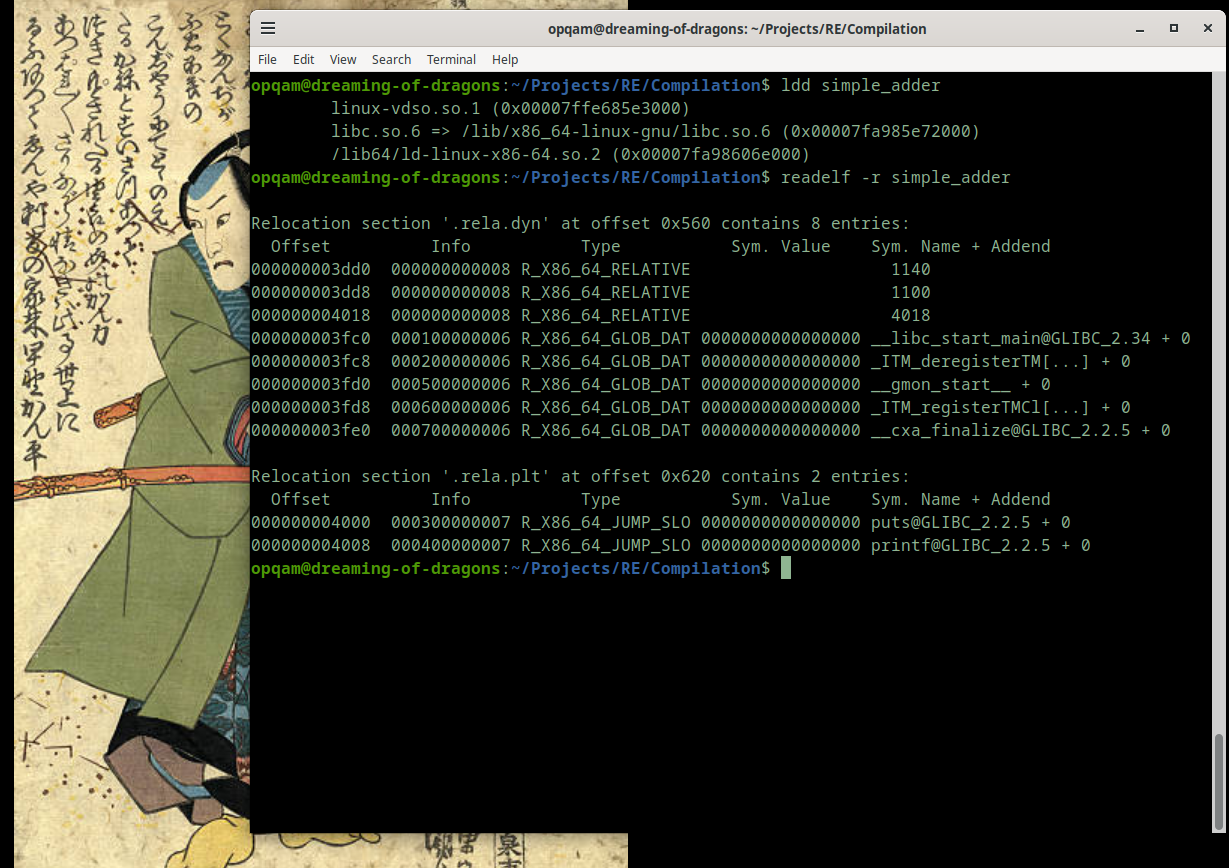
But there's more ways to inspect your ELF files. Let's look at ldd which prints shared object dependencies and use readelf with '-r' to check relocation tables:


What's all of this, you say?
With ldd we can check the shared libraries within our binary. Each listed library representing a dependency. And relocation tables are essential for adjusting addresses in a dynamically loaded binary. Entries like R_X86_64_JUMP_SLOT or R_X86_64_GLOB_DAT help resolve function calls or global variables at runtime.

There's more, of course. But this stuff is much more fun to experiment with than just to talk or write about.

Go at it. Experiment with creating your own binary files and examine them with any or all of these tools (or others). Change things, check again.


No elves were harmed in the making of this blogpost. Nor any DWARF, of course.


Sunday, October 20, 2024

Wherein We Study A Buffer Overflow And Ready Our Aim: testing the waters


Initial disclaimer: please check the link below, as it will be necessary when following along the pdf.


Hi, again! Ready for some more low-level code goodness?
Today we'll take a look at some very simple, yet purposefully flawed C programs in order to learn a bit more about buffer overflows, grasping control of the return address and disrupting a program's flow.

In the first example, we'll see that the program will result in a segmentation fault, and understand why that's happening exactly, by looking at the disassembled code under the GDB debugger. We'll then talk a little about registers, the return address, its importance, and how to grab control of it.

In the second example, we'll take a look at the basics, which will let us finally take advantage of the return address through a buffer overflow.
But, without much ado, let's jump to our first example. Remember that these two first programs are directly taken from Smashing The Stack For Fun And Profit, which you can find here (revised edition! - please follow this link to disable defenses. Alternatively check this. If you don't do this, you won't be able to take advantage of these methods).


This program is creating a char array named large_string which can take up to 256 characters, and then it's filling large_string with A's. After that's done, the program is calling a function named function, using large_string as the argument. The problem becomes immediately obvious since, as we can see, inside that function, we're filling a char array entitled buffer with our A's. But our buffer can only take in 16 characters. Ergo, we have our buffer overflow.

Function was created and its local variable buffer can only hold so many of our A's. But, since we're using strcpy, which has no control for how many values we can enter, we'll just keep on writing A's until we reach the null character (at the end of large_string).

But let's open our debugger and actually see what's happening here.


So, we're looking at main(). Can you see our loop? We're moving 'A' into eax and advancing the counter at ebp-12. A is the ASCII representation of number 41:

   0x000011ea <+50>: mov    BYTE PTR [eax],0x41

Adding +1 to our counter at ebp-0cx:
   0x000011ed <+53>: add    DWORD PTR [ebp-0xc],0x1

And comparing that value with 254 (so as to know when to end the loop):
   0x000011f1 <+57>: cmp    DWORD PTR [ebp-0xc],0xfe

When this is finally done, as I'm sure you can see, we're jumping right into our function, and this is where the fun starts. Let's disassemble it:


Please take a moment to learn what's happening here, and compare it side by side with the C code. But let us move on and actually see what's happening with our memory, as we set a breakpoint in main:


With x/32x $esp, we're checking memory position 0xffffcfa0, to which ESP is pointing, and the addresses 32 bytes above that. I won't go into much detail. You'll see soon enough what will happen when we step forward and finally reach our function breakpoint:


Looking at the memory addresses, it's obvious what happened: these locations were filled with 0x41414141 or, in plain text, AAAA.

It's important to note that the A's are being written from higher memory positions to lower ones. This is crucial because one of the last things overwritten is the return address, which will cause our segmentation fault.

As we move along, at a certain point, the return address will also be filled with A's, and at that moment we won't have a valid return address any longer. As a result, our program will suffer a segmentation fault.


And that's it. We're going nowhere fast. This program has just died on our hands. If we were trying to crack this program, we would have wanted, instead, to take control of the return address stored next to EBP. We'd use that value and point towards some other function we wanted, for example, thus altering the program's flow in our favor.

Yes, we're slowly creeping towards true shellcode. We'll get there eventually, don't worry.

But before we do that, we might as well talk about other interesting tidbits that can prove helpful when using a debugger and watching our shellcode or buffer overflow in action.

I've already shown quite a few pics, so I won't give you another one, but here's the very first function that appears in our "Smashing the Stack" doc. It's pretty simple, but it hopefully shines a light on the function we've been analyzing so far:


void function(int a, int b, int c) {

char buffer1[5];

char buffer2[10];

}

void main() {

function(1,2,3);

}


If we look at the memory locations, as we did before with the other program, we'll see:

0xffffd09c: 0x00000000 0xf7ffcff4         0x0000002c 0x00000000
0xffffd0ac: 0xffffdfc0         0xf7fc7550 0x00000000 0xf7da2a4f
0xffffd0bc: 0xffffd0e8 0x565561e5 0x00000001 0x00000002
0xffffd0cc: 0x00000003 0xffffd110         0xf7fc1688 0xf7fc1b60
0xffffd0dc: 0x00000000 0xffffd100 0xf7fa2ff4 0x00000000
0xffffd0ec: 0xf7da92d5 0x00000000 0x00000070 0xf7ffcff4
0xffffd0fc:         0xf7da92d5 0x00000001 0xffffd1b4 0xffffd1bc
0xffffd10c: 0xffffd120 0xf7fa2ff4 0x565561b6 0x00000001

I have put in bold important addresses and their contents. In order, from left to right, going down...

ESP

  • Points to the current top of the stack.
  • At 0xffffd09c (the lowest memory address in this snapshot)
  • ESP is showing the exact spot in memory where new data are pushed onto the stack

Saved EBP

  • At 0xffffd0bc
  • The base pointer of the caller function
  • This marks the base of the previous stack frame before the current function was called

Return Address

  • At 0xffffd0c0
  • This is the address the program will jump back to after the current function completes
  • overwriting this location with a malicious address can cause the program to "return" to an arbitrary memory location

Variables

  • Just below the saved EBP and return address are the local variables and parameters
  • At 0xffffd0c4 (0x00000001), 0xffffd0c8 (0x00000002) and 0xffffd0cc (0x00000003)

Buffer

  • Just below these local variables we can see the space that has been assigned to our buffer1 and buffer2 local variables
  • It's not 5+10 bytes in size. Instead, because of padding and alignment, it will be 8+12 bytes in size, for a total of 20 bytes.
---

Next up: We'll learn how to control the return address and force the program to do our bidding. This will set the stage for mastering the art of shellcoding! 

SUDO INIT 6: Rebooting Your C Journey

                                                                  Yeah, let's do just that. So grab some popcorn and lean back.   I'...